The post Where to Buy Used Computer Parts: 5 Great Online Sources appeared first on BardTech.

Computer part manufacturers are typically quick to phase out an older part of a product once it becomes obsolete by newer components. This leaves anyone who is trying to find cheap replacement computer parts for an older computer in a tight spot.
At the same time, you may have newer computer equipment in need of repair . Maybe the computer is no longer under warranty or you bought it second-hand. Suddenly you find yourself in search of an affordable, used replacement part.
Luckily there are some terrific online shops that offer used computer parts for sale and newer ones, and they may just save you a few bucks.
1. eBay
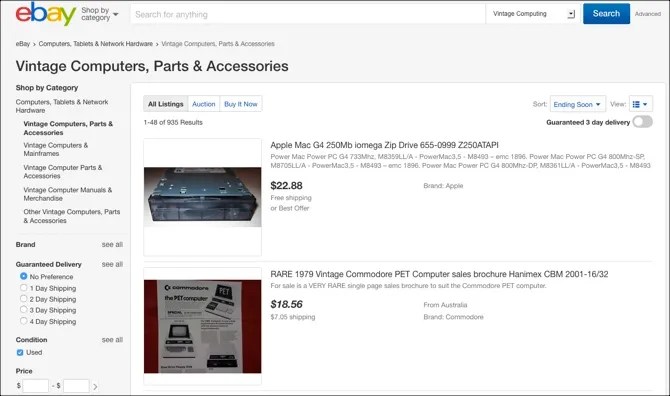
You’re probably already familiar with eBay, the ultimate online flea market and one of the best sources for old and new used computer parts. Finding any popular component made within the last two decades is fairly simple and finding parts older than that is also quite possible.
Navigate to the computer area by clicking it under Electronics from the top. Then you can browse by tons of subcategories. Take a look at components and parts, drives and storage, or head straight to the vintage computers, parts, and accessories area for the oldest of the oldest.
Once you narrow down the category and subcategory for your search, scroll down on the left side under Condition and select Used to see only those products.
For one of the largest selections of used (and new) computer parts for machines old and new, you’ll likely find it on eBay. If you’re in search of parts for building a server or your own PC , eBay is also a solid place to shop for the pieces you need.
2. Amazon

If you already shop on Amazon like millions of others, then looking for those used computer parts you need is just a click away. You can navigate to the computer accessories section just like on eBay. Head to the computer area in the Electronics department. Look for components and parts, memory and cards, or hard drives and cooling modules. Just be sure that you scroll down the left side under Condition and click Used.
Once you select a product, be sure to view all the buying options by clicking the Used & New link at the bottom of the item description. This will give you a list of prices, tax and shipping, and seller information to ensure you get the best deal for yourself.
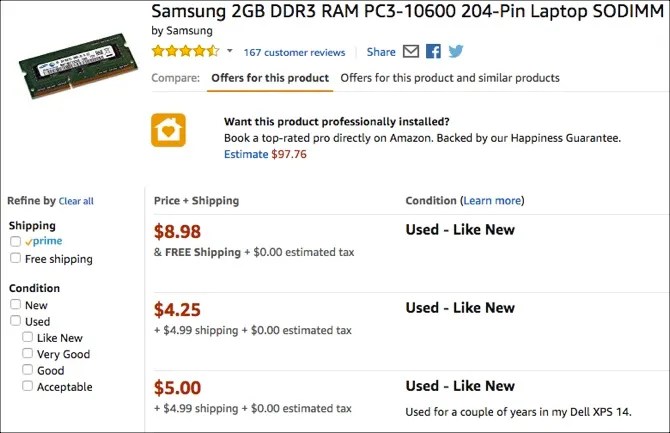
Amazon’s search feature is another effective way to find your product rather than moving through the site’s navigation. And keep in mind, the left side of the screen provides you with a huge variety of filtering options. Whether it’s by an operating system, processor type, RAM size, or another element of the product, you can quickly narrow down your options.
Aside from the large selection of used computer parts and components, buying through Amazon is simply convenient if you’re a current shopper.
3. BMI Surplus

BMI Surplus sells new and used scientific and office equipment as well as computer parts . You can browse for parts like memory, monitors, laptops, media, and storage. The Computer Parts category from the navigation contains an array of different types of items. With everything from video cards to cooling modules to CPU chips, you’ll find plenty of miscellaneous pieces.
With any of the categories, you have the option to sort by product name or price if you’re browsing. Or, simply pop your keyword into the search box to narrow down your options from the start. The products have a handy Ask a Question option. So, if the description and photo doesn’t cover it or you want a shipping quote, just click the button and fill out the form.
BMI Surplus may not be all about computers as you’ll see the lab equipment and electronic parts on the site too. But, if you are in search of a used computer part, it’s definitely worth a look.
4. OfferUp
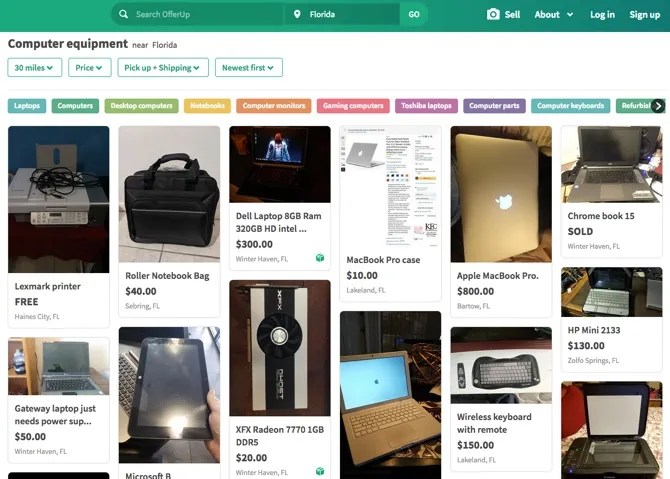
If you’re interested in looking for computer parts online, but would like to buy local, check out OfferUp. Similar to BMI Surplus, OfferUp doesn’t stick to computer parts. The site has categories for items from automobiles to weddings. However, you may find just what you’re looking for in the Computer Equipment section.
When you add your location to begin looking for computer parts, you can choose the distance from your spot. You can also sort items by pick up or shipping, price, and newest first. Check out refurbished laptops, monitors, computer towers, keyboards, and miscellaneous parts.
OfferUp is a great site to keep in mind for both buying parts and selling them. So, if you like the idea of both, be sure to head there for a visit. And, if you prefer to hang onto your older and unused computer items, check out a few things you can do with an old monitor .
5. DreamHardware.com

If for some reason you still can’t find the computer part you’re looking for after checking the sites above, then it’s time to look on DreamHardware.com. The website specializes in discontinued and obsolete computer components; new, used, and refurbished.
You can quickly find motherboards, hard drives, memory, CPUs, sound cards, video cards, and more. Perform a search or select Products from the top navigation to browse for your item. You can scroll down to Condition on the left and choose only Used or Refurbished items if you like as well as apply helpful filters.
DreamHardware.com has been doing business for many years, offers a large inventory, and might just become your go-to online shop for hard-to-find computer parts and components.
Good Luck in Your Search!
Finding where to buy computer parts online isn’t as easy as you would think, but websites like these make the task much easier. Hopefully, these sources will help you find those old, used, or discontinued computer parts you’ve been looking for at reasonable prices.
If you’re interested in upgrading your equipment, find out how to upgrade your laptop DVD drive for a different type or if an upgrade to an old computer will make it use less power .
Image Credit: Raimundas/Depositphotos
Read the full article: Where to Buy Used Computer Parts: 5 Great Online Sources
The post Where to Buy Used Computer Parts: 5 Great Online Sources appeared first on BardTech.
Tags: Buying Tips, Computer Parts, Internet, Online Shopping, Save Money, computer, great, online, parts, sources, where
Original link: https://ift.tt/2BEF5Pavia BardTech
Comments
Post a Comment