The post The Best Microsoft Office Templates for Teachers Going Back to School appeared first on BardTech.

Templates are some of the handiest tools we can use for creating documents. If you need a template for an existing or new business or any personal tasks , templates help us get the document done faster and easier than starting from scratch.
So, to help those instructors, professors, and teachers who are looking for a way to speed up document creation throughout the school year, here’s a list of Microsoft Office templates just for you.
Emergency Contact List

Get ready for a new school year with this emergency contact list template. You can list all students’ names, their primary and secondary contacts with three phone numbers each, and any medical conditions or concerns.
This is a great Microsoft Word template for keeping your students’ emergency contacts all in one spot.
Student Information Sheet

For keeping track of each student’s details individually, this student information sheet template is ideal. Start with basics like the student’s parent or guardian contact information including physical addresses, phone numbers, and email addresses.
Then use the second page to list concerns. There are sections for medical and allergy details, academic issues, social concerns, and an area for anything outside those categories.
Volunteer Signup Sheet

When you are looking for some help in the classroom, with donating supplies or planning field trips, you may need to turn to the parents and guardians. This volunteer signup sheet template for Microsoft Excel works well for most any type of activity or event.
Volunteers can add the job or activity, date and time, their name, address, phone number, and email address. You can use this sheet to keep track of those who are willing to lend a helping hand and contact them easily when it’s their turn.
Short Class Syllabus

If creating a short syllabus at the beginning of the school year is part of your tasks, then take a look at this Word template. Begin with the goals for the class. Then list the needs and resources including required background details, materials needed, print resources, and online resources.
You can add rules, policies, and grading scale details in the policies section, include additional information if needed, and finish it off with your contact information. For a brief syllabus for just one class, this template helps you get it done.
Longer Class Syllabus

Another nice class syllabus option is this next Word template. It includes the same basic information as the one above, just formatted a bit differently. The instructor’s contact information is at the top, followed by a course overview. Next, you’ll see sections for the class goals and necessary materials.
The course requirements area is lengthier in that it breaks down the items for more detail. You can list your point system for exams and assignments and provide descriptions for participation and attendance. The end of the syllabus template has spots for student expectations and general policies that include rules for written work, exams, and email.
This template is perfect if you want to expand your syllabus and need to those extra sections.
Monthly Attendance Workbook

Get ready to keep track of who shows up for class and who doesn’t with an attendance sheet template. This one for Excel is useful because it includes a tab for each month. Then you’ll see a tab for year-to-date attendance which is automatically populated from the other tabs.
You can use both student IDs and names and have room for 30 students. Instructions for using the template are on the first tab on the year-to-date overview.
Weekly Attendance Sheet

If you prefer a weekly attendance sheet, then this next template is for you. For Excel, the template has spots for a room number, period, teacher, course, and week of for you to pop right in.
List out your students’ names and then follow the simple key for their attendance status. You have present, tardy, unexcused, and excused listed across the top. So, you can just enter a mark for each student’s attendance option for that week. This also makes glancing at the overall attendance for the week easy.
Basic Individual Lesson Plan
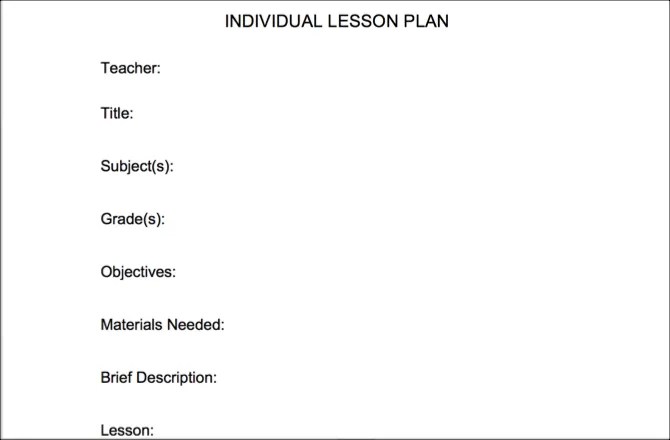
For a very basic, simple lesson plan, this template works. Fill out the sections starting with teacher, title, subject, and grade. Then move onto objectives, materials needed, a brief description, and lesson. And finish it off with the assessment, source, and standards sections.
If you want a short and sweet lesson plan template, this one for Word is a good option.
Organized Lesson Plan
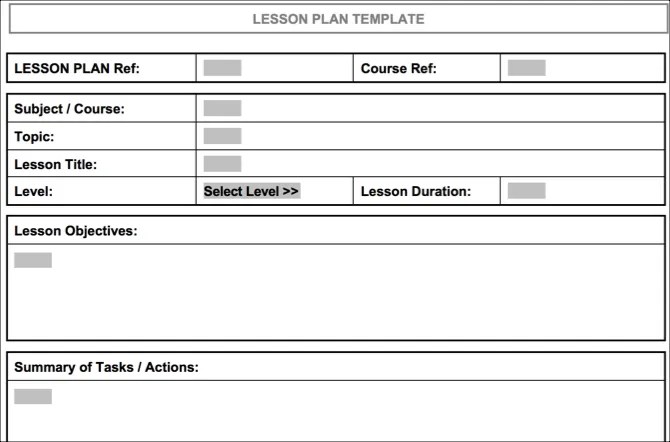
If you prefer a lengthier lesson plan with a clear structure, then check out this organized lesson plan template for Word. Using a table format, you can enter a code for the lesson plan and course reference. Then input the subject or course, topic, lesson title, level, and lesson duration.
The next sections of the table are for objectives, a summary of tasks, materials or equipment, references, and take-home tasks. So, if a more detailed lesson plan is what you seek, then this is the one for you.
Weekly Lesson Plan
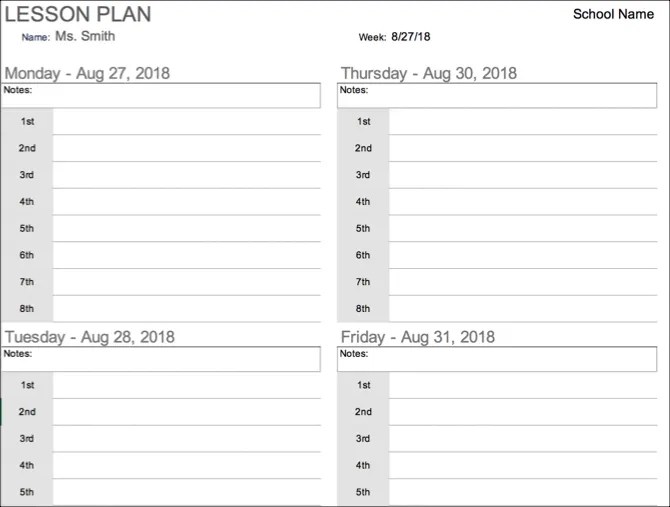
This next lesson plan template isn’t for individual classes but for weekly planning instead. You can quickly add the lessons you are planning for the first through the eighth periods of the day as needed.
When you enter the date for the week, the days and dates in the plan automatically adjust. There is a place at the top of each day for notes and a larger place at the end as well. If you use a weekly plan for lessons, then you’ll like this template for Excel.
And, if you’re in the market for an actual calendar, take a look at these calendar templates for Microsoft Office .
Parent / Teacher Conference Form

If you teach elementary or middle school, then you likely set up parent / teacher conferences at least once during the school year. This Word template can help you get a jump start on the planning for those important meetings.
The top of the form has all the basics with the school, student, and parent or guardian names. It’s the bottom part of the form that makes things easier. There are three sections for strengths, concerns, and ideas. You can mark the boxes for the items that apply in each section, adds notes to each, and include more comments at the bottom.
Meeting with each student’s caregiver is quite a task, but this template makes your preparation easier.
Conference Record

If you would like something less formal for your parent/teacher conferences, then this Word template might be right up your alley. Less structured, you still have places for the basic details at the top.
Then you can write more descriptive text for each of the sections rather than just marking checkboxes. Fill out the effort and progress, behavior and social skills, and goals and plans. There are spots for parent questions and concerns as well as additional topics.
This type of template lets you fill out what’s needed before you meet and then jot down more details during the conference.
These Office Templates for Teachers Earn an A+
Concentrate on the class, the lessons, and the instruction you give, rather than the documentation. These handy templates for Microsoft Office should help and we also have several educational templates for PowerPoint for you.
And if you want to help your class even more, we have a list of useful templates for students you can share with them.
Image Credit: Syda_Productions/Depositphotos
Read the full article: The Best Microsoft Office Templates for Teachers Going Back to School
The post The Best Microsoft Office Templates for Teachers Going Back to School appeared first on BardTech.
Tags: Education Technology, Internet, Microsoft Office 2016, Microsoft Office Tips, Office 365, Office Templates, Productivity, going, microsoft, office, school, teachers, templates
Original link: herevia BardTech
Comments
Post a Comment