The post How to Remotely Sign Out of Your Social Media Accounts appeared first on BardTech.

If you’ve misplaced a device logged in to your social media accounts, a surefire way to end that access is to change your password. If you don’t want to change your password just yet (as advisable as that may be), a few social media sites also make it easy to remotely log out of any sessions with the click of a button.
How to Remote Sign Out of Facebook
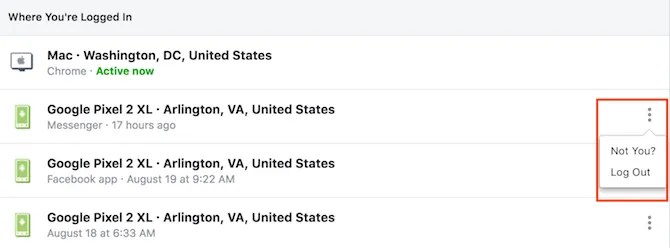
If you’re worried that someone else is using your Facebook account , you can remotely log out of any Facebook active sessions by doing the following:
- Go to Settings > Security & Login.
- Under Where You’re Logged In, you’ll see a list of all the instances of where you’ve been logged into Facebook and when. Information includes location, time, device type, and browser.
- Click the three dots button next to the instance you want to remove and click Log out. If you want to log out of all of the sessions, scroll down to the end of the list (you may have to click See More) and click Log out of all sessions.
Facebook also offers a way to make sure your account is secure. When you click on the three dots button and click Not You, the site will guide you through a series of steps to better secure your account, including changing your password and allowing you to review your recent activity to see if there are any changes you don’t recognize.
How to Remote Sign Out of LinkedIn

LinkedIn also makes it easy to see all active sessions and log out:
- Click on your profile picture and go to Settings & Privacy.
- On the first tab that opens up, under Login and security click Change next to Where you’re signed in.
- This will show you all active sessions of your account. To log out of any of those sessions, click Sign out.
How to Remote Sign Out of Pinterest

Signing out of active sessions on Pinterest is also an easy task:
- Go to Settings and scroll down to Security and click Show sessions.
- You’ll see a list of your current and recent sessions listed by location, device, and date.
- To remotely log out of any of these sessions, click End activity.
How to Remote Sign Out of Twitter
Twitter doesn’t actually offer any features to remotely log out of your accounts. Instead, if you have any concerns, you’ll have to change your password.
You can, however, revoke access to various apps by going to Settings & privacy > Apps and clicking Revoke Access to any apps you no longer want accessing your account.
How to Remote Sign Out of Instagram
Instagram also doesn’t make it possible to remotely log out of your account. Instead, you’ll have to change your password. You can do this by going to Settings > Password. This will send an email to your associated email account with a link to reset your password. (It can sometimes take a while for the email to show up).
Other Measures to Protect Your Social Media
In addition to remotely ending active sessions, there are plenty of other security measures worth considering including two-factor authentication , getting notifications of unfamiliar activity, revoking access to apps and checking your social logins .
Read the full article: How to Remotely Sign Out of Your Social Media Accounts
The post How to Remotely Sign Out of Your Social Media Accounts appeared first on BardTech.
Tags: Security, Short, Social Media, accounts, media, remotely, social
Original link: herevia BardTech
Comments
Post a Comment