
Datally can disable data usage while you sleep, save data for emergencies

The post Datally can disable data usage while you sleep, save data for emergencies appeared first on BardTech.

datally data google

Smartphones have assuredly brought massive convenience to our daily lives. There really is no debating that point. However, with that convenience, there have been a couple of pain points. One of these issues is battery life, which Google has been working on fixing.  The other is trying to maintain control of how much mobile data our devices use, which is where Datally comes in.

As far as mobile data usage controls have been concerned, there have always been some minimal settings within Android itself. However, back in November of last year, Google released an application into the Play Store called Datally . As you would expect, the entire goal of Datally is to give you more control over when, where, and how much mobile data your smartphone is allowed to use throughout the day. Before Google released this application to the public they did a small test in the Philippines for a few months and were able to save their users up to 30% of their mobile data usage.

Google hasn’t given up on the application either with it being shown to be very popular at over 10,000,000 downloads in the Play Store. A couple of months ago the team behind the application added 4 new data saving tools including Guest Mode, Daily Limit, Unused Apps, and a handy WiFi Map. Just earlier today there was a new blog post published on Google’s Keyword blog that shows 2 new features which are being added to Datally.
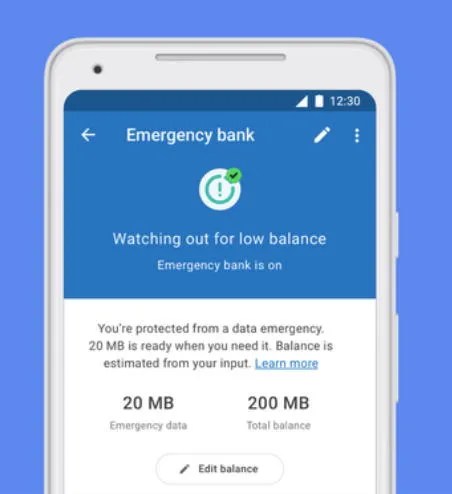
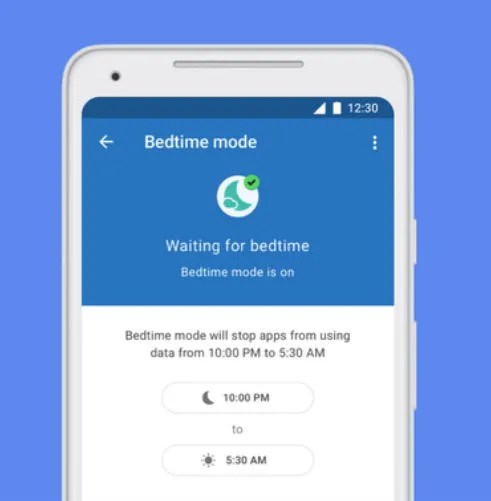
This first feature has been labeled Emergency Bank, and it saves some of your mobile data throughout the month so that you will always have some for emergency situations. All you have to do is enter how much mobile data per month that you would like and Datally will prevent applications from using that amount of data. The second of these 2 new features is called Bedtime Mode. You can configure your bed and wake times so the application knows when it should limit your mobile data usage while you’re sleeping. This will surely save a ton of mobile data from those applications that like to sync a bunch of stuff at night over your mobile connection.

Datally: mobile data-saving & WiFi app by Google (Free, Google Play) →


Source: Google

Original Content By XDA Developers

The post Datally can disable data usage while you sleep, save data for emergencies appeared first on BardTech.


Tags: data, data plan, data usage, Google, Mini XDA, mobile data, News, datally, disable, emergencies, sleep, usage, while

Original link: here
via BardTech

Comments

Popular posts from this blog

How to change the PIM of a VeraCrypt volume

The developers of VeraCrypt introduced Personal Iterations Multiplier (PIM) functionality in the encryption program in version 1.12 . PIM stands for "Personal Iterations Multiplier". It is a parameter that was introduced in VeraCrypt 1.12 and whose value controls the number of iterations used by the header key derivation function. PIM is used by volumes even if the creator of the volume did not specify a value. It is an optional component that improves security: it adds another step to the authentication process similarly to two-factor authentication. The main difference is that the PIM value is fixed and not generated on the fly when requested. An attacker needs to know the master password and the PIM, if not set to default, to breach the encryption successfully and access the content of the drive or partition. A couple of good reasons exist to change the PIM value: It was leaked or stolen. The default value is used and that is not as secure as using a custom PIM. Yo...

Huawei Mate 20 Pro launched in India with Kirin 980 for ₹69,990 ($988)

For years, the highest-end Android flagship used to be defined by Samsung’s Galaxy Note series as the “best-of-the-best” Android phones. Google entered the premium smartphone segment in 2016 with the Google Pixel . In addition, one company that has been steadily improving its flagship phones is Huawei. Huawei has also been steadily increasing the prices of its flagship phones at the same rate. Indian consumers, however, were left out as Huawei had not opted to launch any Mate series phone in India before. This year, as the company’s strategy has changed, high-end flagship smartphone buyers now have another option to choose from. The Huawei P20 Pro was launched in India in April . Now, Huawei has launched the Huawei Mate 20 Pro in India—the first ever launch of a Mate series phone in the country. The Huawei Mate 20 Pro is the successor of the Huawei Mate 10 Pro . It’s positioned as a higher-end variant of the standard Huawei Mate 20. It should be noted that Huawei didn’t launch the s...

The 5 Best Free IPTV Apps to Watch Live TV on Android

It’s easier than ever to watch on-demand TV shows and movies on your Android device. But what about live TV? Yes, there are services like Sling and PlayStation Vue. However, if you know where to look, you don’t need to subscribe to their expensive plans. You can use free IPTV instead; you just need an IPTV app and an IPTV source. What Is an IPTV App? IPTV apps are a bit like Kodi; they are empty shells that can’t stream any content without some user input. You have the responsibility for adding channels, playlists, and other sources. Typically, you cannot use the apps to watch Netflix, Hulu, or direct content from other third-party providers. Here, we’re not interested in the best on-demand streaming apps or places to watch TV online. We are only looking at the IPTV apps themselves. Specifically, we want to know what the best IPTV apps on Android are. 1. Lazy IPTV Our first pick is Lazy IPTV. It supports M3U playlists in open-view, ZIP, and GZ formats. The app can also read pl...